Prepare the Drupal backend
Make an existing Drupal site Druxt-ready: modules, JSON:API settings, permissions and the minimum content the frontend needs.
The quickstart provisions a ready-made backend. This guide is for the other case: making a Drupal site you already have Druxt-ready. (Starting from nothing? Create a site with Drupal's own instructions first, then return here.)
Commands run in the Drupal project root. composer manages Drupal
dependencies; drush is Drupal's CLI, installed
into the project with composer require drush/drush. If the backend
runs in a container, prefix commands with your tool's exec command.
Every step also has an admin-UI path, noted as it appears. If Drupal and
its tooling are new to you,
Drupal for Nuxt developers
explains the concepts these steps lean on.
Install the Druxt module
composer require drupal/druxt
drush pm:enable druxt -y
The module depends on core's jsonapi module and three contrib projects:
Decoupled Router,
JSON:API Menu Items
and JSON:API Views.
Composer downloads them with the module, and enabling druxt enables all
of them. In practice this needs Drupal core 10.1 or later (the module
itself accepts 8.8+, but its Decoupled Router 2.x dependency requires
10.1), and the maintained backends test against 10 and 11.
Keep Decoupled Router below 2.0.7 for now
(composer require 'drupal/decoupled_router:^2.0 <2.0.7'). 2.0.7
changed a subscriber signature the current Druxt module does not
declare, and route resolution silently stops working
(#3618675).
If composer refuses with a stability error, a dependency's current
release is below your project's minimum-stability (set in the Drupal
project's composer.json). Allow the pre-release for that one package
with a stability flag, as in
composer require drupal/jsonapi_views:^1.1@beta, rather than lowering
minimum-stability project-wide.
Grant the permission
Every Drupal site has the Anonymous and Authenticated roles (plus any
you create), and permissions attach to roles. Grant Access DruxtJS JSON:API resources
(access druxt resources) to every role the frontend connects as, at
/admin/people/permissions or with drush. For a public site that is the
Anonymous role:
drush role:perm:add anonymous 'access druxt resources'
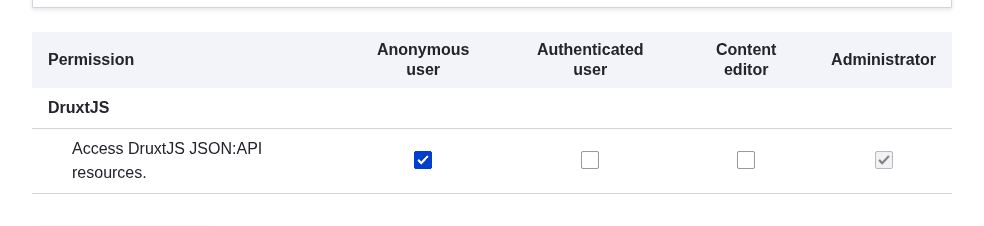
The permission grants read-only (GET) access to the configuration resources the frontend needs to build itself: entity view and form displays and modes, field and field storage configuration, JSON:API resource configuration, blocks, languages, menus, menu links and views. Without it, every one of those requests returns 403, and the errors name the underlying resource rather than the permission, which makes the cause hard to spot. See the 403 entry in Troubleshooting.
It grants nothing else: content entities keep their normal Drupal access rules. Granting it to Anonymous exposes structure (display and field configuration), not content that Drupal would otherwise protect. If that trade-off is not acceptable, connect as an authenticated consumer instead and see the topology notes on cookies and sessions.
Check the JSON:API settings
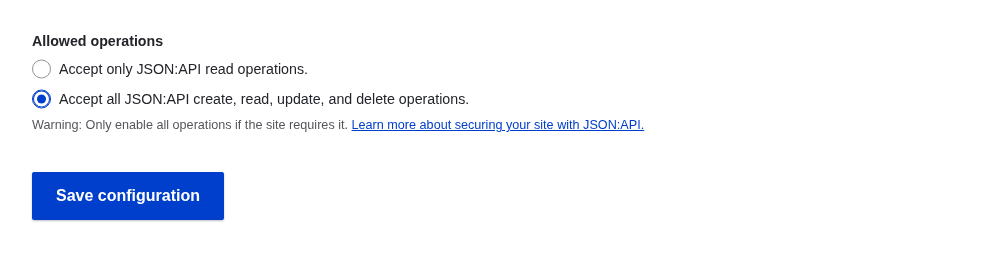
Core's JSON:API defaults to read-only mode. Reads are all Druxt needs to
render a site, but form submissions through
DruxtEntityForm are JSON:API writes and will fail
with 405 responses until writes are enabled, at
/admin/config/services/jsonapi or with drush:
drush config:set jsonapi.settings read_only 0 -y
Skip this if the site never writes through the API; read-only is the safer place to stay.
Have some content and displays
When the frontend builds (its build-time
context), it derives
schemas from entity view and form displays. A
site with no content types cannot produce any schemas, and the build stops
with No Druxt Schema files generated. Have you created any content types yet?. At minimum, create one content type before the first
frontend build. The Druxt module creates missing view displays for new bundles
automatically.
Display changes made after the frontend starts need a rebuild or dev server restart to appear. See the display-change entry in Troubleshooting.
Commonly added modules
Not required, but production Druxt sites regularly add these:
| Module | Why |
|---|---|
| JSON:API Extras | Rename or re-prefix the API path (pair with Druxt's endpoint option, e.g. endpoint: '/api'), disable unused resources. |
| JSON:API Image Styles | Expose image style URLs so the frontend can use derivatives instead of original files. |
| Redirect | Legacy URL redirects, resolved through the decoupled router. |
| Simple XML sitemap | Generate the sitemap on the backend and serve or proxy it from the frontend. |
| m4032404, a 403-to-404 mapper and r4032login, a 403-to-login redirect | Sane 403/404 semantics for decoupled route resolution. |
Decoupled Router installs with absolute_resolved_urls enabled, so
resolved routes come back as absolute URLs. Leave it on.
Cross-origin access
If the frontend and backend are served from different origins, decide between configuring CORS in Drupal and proxying browser requests through the frontend before you deploy. Request topology explains the difference; Configure CORS and Proxy the backend are the two implementations.
Checklist
| Item | Command or place |
|---|---|
| Druxt module installed and enabled | composer require drupal/druxt + drush pm:enable druxt |
| Permission granted to the connecting role | drush role:perm:add anonymous 'access druxt resources' |
| JSON:API writes, if forms are used | drush config:set jsonapi.settings read_only 0 |
| At least one content type with a display | Drupal admin |
| CORS or proxy decided | Request topology |